Pop!_OS + COSMIC Beta Review
Today we're checking out Pop!_OS and (more specifically, really) COSMIC Beta. COSMIC is the "desktop environment", or the "GUI", if you will. @pop_os_official@fosstodon.org @opensource@programming.dev @linux@lemmy.ml

Today we're checking out Pop!_OS and (more specifically, really) COSMIC Beta. COSMIC is the "desktop environment", or the "GUI", if you will. If you're not a Linux user you might still be confused. It's basically the graphical way you interact with the computer. There are many different Desktop Environments (DEs) but overwhelmingly the top 2 are GNOME (pronounced Guh-nome) and Plasma. GNOME closely resembles MacOS and Plasma more closely resembles the Windows UI. DEs are unique to Linux because you can use any DE with virtually any distro. COSMIC was just created by System76, a Linux-specific computer seller, who also makes Pop!_OS, so it's a natural fit, but it's also available for many other distros.
A bit about me, I am not a Linux developer. Or really even very good at Linux. For that reason there may be some "bad takes", or criticisms that are for some reason technically infeasible, but I make my takes as something resembling "the average user".
GNOME is my favorite DE. Plasma is also great, however it's "too much" for me. Too many options and settings and it also does not feel very "modern", in my opinion, and I can't be bothered going through the themes to make it that way. Cinnamon is another popular one that comes shipped with Linux Mint, which looks (in my opinion) extremely dated, and I don't specifically recommend it to anyone for that reason (but I wouldn't discourage it either. Functionally, it's great, it just gives a bad impression to a new user, in my opinion).
I also want to recognize that this is Cosmic Beta, and as such there are some bugs to be expected that should be ironed out in a "stable" release on Dec. 11th.
The Good
Pretty much everything works! WiFi, bluetooth, speakers, microphone, keyboard shortcuts (volume, brightness, even the mic mute button).
I've experienced very few graphical issues. Off the top of my head, Steam had an issue showing the notifications in the bottom right. They were cut off the screen. And at one point the taskbar icons started flashing rapidly and I couldn't click anything.
Stable Ubuntu. If anyone makes an app for Linux, it's almost guaranteed there is a .deb version, which will work on Ubuntu (or Debian), which is great. It's also a very stable, dependable and reliable install base. There are no Snaps, fortunately.
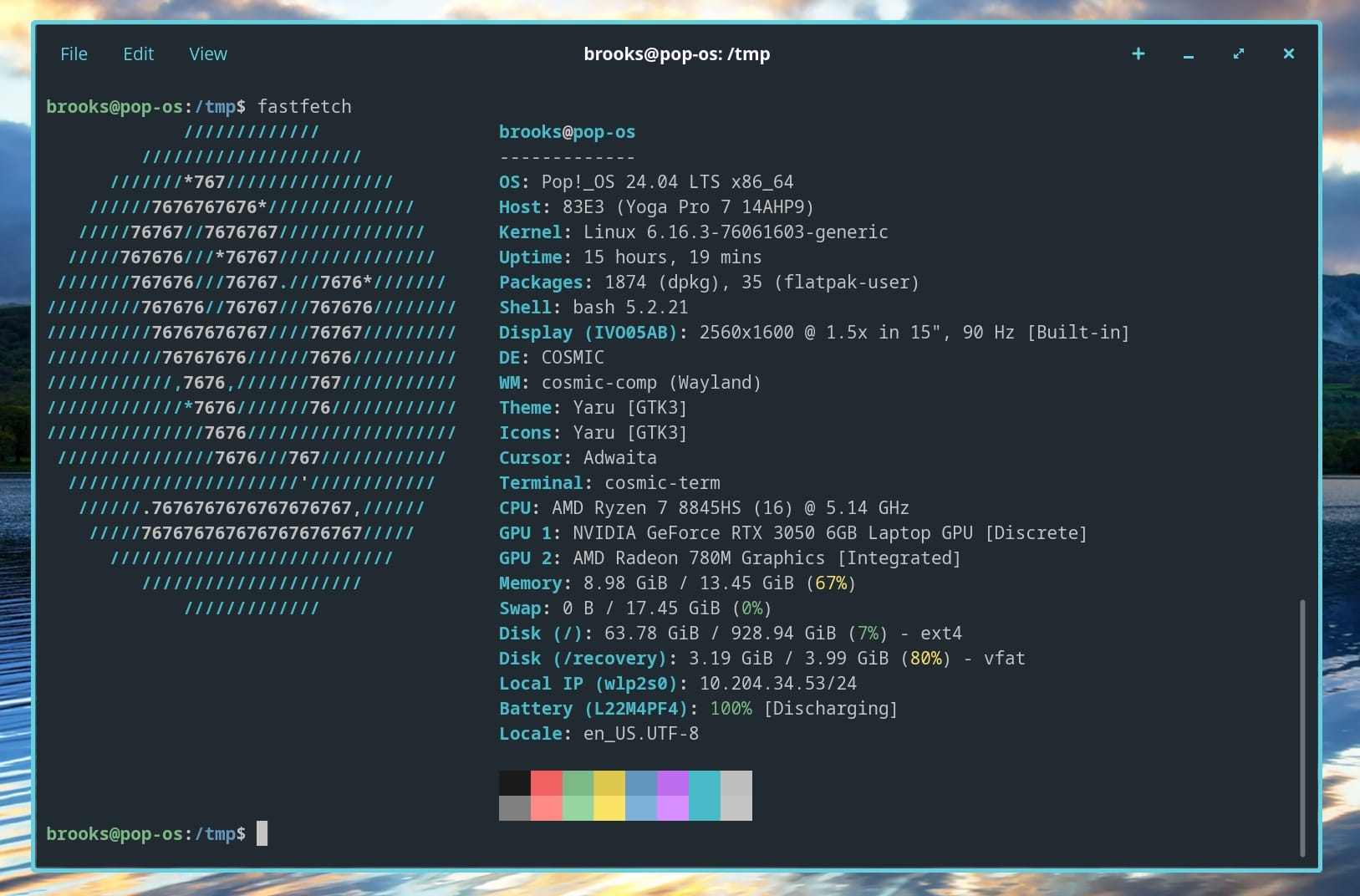
The UI is really nice. It really strikes a good balance between GNOME and Plasma, especially as it pertains to the settings and options available. It has a very modern appearance. I especially like the glowing borders that show which window is focused. You can see this (and my hardware) in the main image of this post. Although it would be nice to make them a bit thicker. And I wish they were available in full screen for consistency. But these are total nitpicks. You can add the glowing borders to GNOME with an extension, however it is super buggy, and this is not at all.
Fractional scaling applied out of the box! There's nothing I hate more than installing a new distro and immediately having to dig into the terminal to enable this really basic feature, but only a few I have ever used come configured this way. Mint has it but it is not enabled by default, for some reason it's buried in the display settings another layer deep. Yes yes, blurry text and whatever but who cares when everything on the screen is either so small that you can barely see it or so big that it consumes all of your limited screen real estate?
COSMIC store is cool! I'll detail below why I love GNOME but the GNOME software store is atrocious. This is the best one I've used!
A big feature of COSMIC is the tiling window environment. And not just the tiling but the ability to switch back and forth between tiling and floating on the fly. You can even have 1 (or more) workspace tiled, and another floating!
Ships with Nvidia drivers! Fuck Nvidia, but unfortunately they comprise like 97% of the GPU market so they are essential. Good thing Pop!_OS comes with the drivers out of the box! No one should have to configure this!
Variable refresh rate out of the box!
Robust settings app. Keyboard shortcuts are built right into the settings. Easy to use and works well.
"Applets"! (AKA extensions). I had to go back and remove a bunch of negative stuff I wrote in the "bad" section after discovering applets. Although this is a bit of a good/bad, as I feel a lot of these things should be included in COSMIC by default, like a clipboard manager, and a taskbar manager (to remove a bunch of unnecessary (to me) stuff in the taskbar). I like that they're integrated into the COSMIC Store, rather than being in a separate app you have to know about, find, and install, like GNOME extensions.
I get a weird message when booting up or waking from sleep about "RCPI BIOS error, could not resolve". It's literally <1 second, but still not a great experience.
This may be tied to this perpetual firmware update that I'm notified about when booting the PC, but when I click "install and reboot", nothing happens. It just boots up with the same message again.
Progressive web app (PWA) icons do not render properly.
AppImages don't work. It's probably a failure of my technical knowledge but I don't understand why these don't just launch like any other app. Regardless, even after installing Gear Lever, it for some reason made a redundant file and then just...wouldn't open. At all.
Can't reorganize folders in the COSMIC files sidebar.
COSMIC tweaks is cool, but I don't understand why this is a separate app that I have to find and install, or why it's not just built into the "appearance" settings.
The GNOME "system monitor" is lame. Use Mission Control instead, and bind it to ctrl+alt+delete and ctrl+shift+esc for the Windows converts.
There's no way to open apps from within the COSMIC store.
The app drawer has categories, but no "all apps" section, which is a real pain in the butt if you don't know what category your app falls into. Honestly I prefer to just do away with the folders entirely and just have an alphabetical drawer like Android. Although a "frequently used" section at the top would probably be handy.
There's no way to add a day to the date/time section. Nor is there a way to change the format, as the current one consumes a large amount of the taskbar, as it uses alphabetical month and full year, as opposed to mm/dd/yy.
The WiFi icon changes to a key icon when a VPN is enabled. Not sure if I like that. Might just take some getting used to.
Disk encryption is great but it is quite annoying to have to type my password twice when starting the PC. This needs to be as simple as it is on my Mac. Again, I realize there are probably technical limitations, and this is not exclusive to Pop/COSMIC, but we need to figure this out because it really just makes me not want to use it, which is not good. Especially in an era where TSA is copying the data from all electronics and looking for reasons to deny you access to the US.
It needs a better screen capture tool. At the very least there needs to be a way to mark up and/or highlight screen captures. Although I do appreciate the ability to select what happens to the screenshot when I do capture. A screen recording function is also noticeably absent. KDE has Spectacle and Flameshot, both robust screenshotting tools. GNOME has Gradia, which unfortunately only edits screenshots, but it's better than nothing, which is what Cosmic has.
There's no way I can find to add or review repositories in the COSMIC store. You can only add "custom flatpak sources", I guess if you wanted to add Fedora Flatpaks or something for some God-awful reason, you could do that...I guess you get what you get? Not that there are other ones I want to add besides apt and flathub but some certainly will.
Applets! (yes, again). It's fairly confusing to manage them. Honestly as I write this I'm still very confused as to how to manage them. For example, I installed "System Monitor", which is very cool, but it describes itself as being "highly configurable" and yet I couldn't find a single configuration until I looked up the GitHub page and realized you have to manage it from a config file (ew).
You can add and remove them from Settings-->Desktop-->Panel--> (scroll all the way down) Configure panel applets. As you can see, these settings are well-hidden and not very intuitive. The store should probably have a "manage applets" button that takes you to this settings panel. This is also where you can remove the accessibility icon and language icon and (for me) the tiling icon, since I don't use the tiling windows.
For some reason the display settings defaulted to 60FPS. I noticed this immediately while panning through MS Planner. I don't know why it's this way (perhaps it's part of the energy plan?) but it should default to the highest setting. No one buys a laptop with a 90 or 120Hz display just to run it at 60.
The first time I joined a videoconference I got a lot of feedback from participants that I sounded like I was in a wind tunnel or driving down a highway. Apparently that is because my mic was set to 100% out of the box. Turning down to like 15% solved the problem.
The battery indicator not only lacks a numeric readout but also does not have sufficient contrast. It can be difficult to read on a small display:

I wish more people would adopt Apple's battery indicator style:
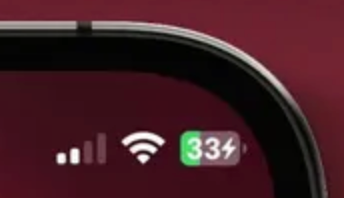
Update: I just got Android 16 and it looks like Google did exactly that. Your turn, Linux.
It's also extremely useful to see a charging/consumption readout in watts. COSMIC does include a "time until empty", which is also nice.
You can see that my laptop has an Nvidia dGPU. There is a persistent indicator that says "Discrete GPU is active and can reduce battery life". I am fully aware of this but there's no way to dismiss this notification, nor the blue dot accompanying it in the taskbar:

There's also not obvious way to deactivate the dGPU, if that's even possible? Because I'm not using it on the desktop. I pretty much exclusively use it in Steam.
No "night light" or "night shift" low-blue-light mode. Not a big deal for me personally as a dark mode user, but worth noting. I don't know how you light mode people operate but I have to assume it's a feature you would appreciate?
No clipboard manager. This is something I use several times a day and should be a basic utility in any OS (even though it's not in any OS, to my knowledge).
The bad
Okay, I'm gonna get up on my GNOME pedestal here for a second and give you my biased take, because the single coolest part of GNOME is how navigation works. I swipe up with 3 fingers and I get the "overview".
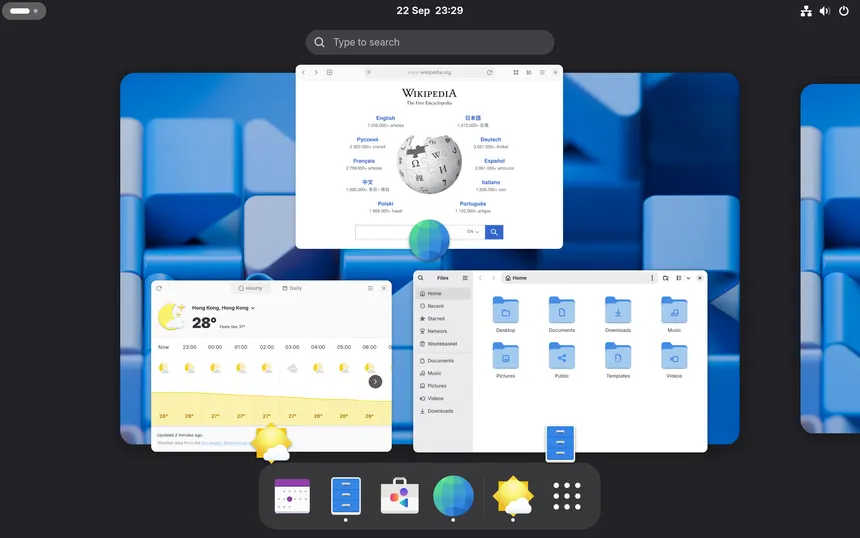
This function actually combines several functions into one. The dock appears at the bottom (hidden otherwise for more screen real estate), all of your open windows are shown (similar to MacOS's "mission control", but better) and you click to bring any of them into the foreground, you can close the windows, you can start typing to search for installed apps, files, or apps from the software store. You can view the active workspaces at the top and swipe left or right to switch between them, and you can swipe up again to access the app drawer, all with 1 trackpad gesture.
In Pop!_OS, these are 4 separate functions. "Launcher" searches for files and apps, "Workspaces" shows your open windows and workspaces, and "Applications" shows your app drawer. In fact, as far as I can tell, it only has 1 trackpad gesture, and that is a 4-finger (why not 3?) gesture to switch workspaces (vertically, for some reason).
There's no "Connect" app. Plasma has KDE Connect. GNOME similarly has GSConnect (which is really just a fork of the former). These apps give you mobile device integration that embarrasses Apple and are invaluable. As far as I can tell, no such application exists for COSMIC.
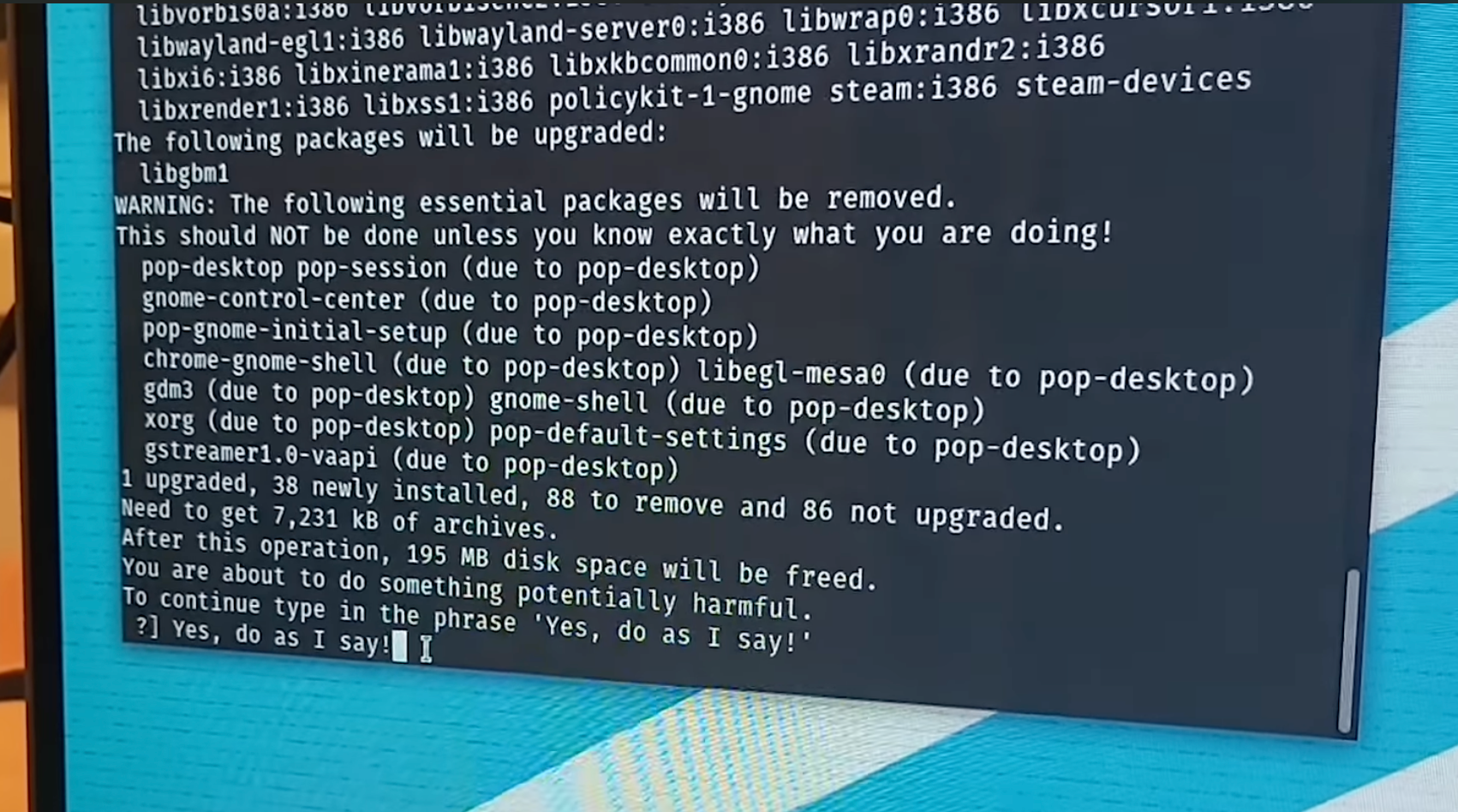
There's still no prompt to update in the installer! If you remember a certain YouTube video where a certain popular techtuber gave Linux a try, picked Pop!_OS, and within 5 minutes had nuked his entire DE, that happened because he did not update the OS before installing packages. Now we can definitely blame him for not reading the prompt before typing "Yes, do as I say!" but then he'd still have to figure out how to fix the problem, and regardless, this is a bad out of the box experience, and all distros should actively recommend the user to update as part of the post-installation process. I've run across countless threads from people who experience bugs when first booting on a variety of distros, only to be resolved shortly after by a quick OS update.
The Caps Lock indicator on my keyboard does not work on the disk decryption screen, nor is there any indicator on the screen that Caps Lock is on. Combine that with a very unforgiving failed password lockout policy, and I was locked out of my own PC for several minutes.
Conclusion
COSMIC is very cool! And I appreciate the addition of another "premium" desktop environment in the mix. I think if I were recommending something for a new user, this would be it! However I don't think it's a fit for my personal preferences. I get the feeling that these are deliberate decisions so likely won't be "fixed" (for lack of a better word) in the future. I'll hold onto it for a few months just because it's novel and new and fun, and hopefully a "stable" release arrives in that time. But most likely I'll be going back to GNOME in the near future.